Combining Shapes (CSG)
Cut, merge, and overlap shapes to build things a single primitive can't — no sculpting required.
CSG stands for Constructive Solid Geometry — a fancy name for a simple idea: combine two or more shapes using boolean logic, the same way you'd combine circles in a Venn diagram.
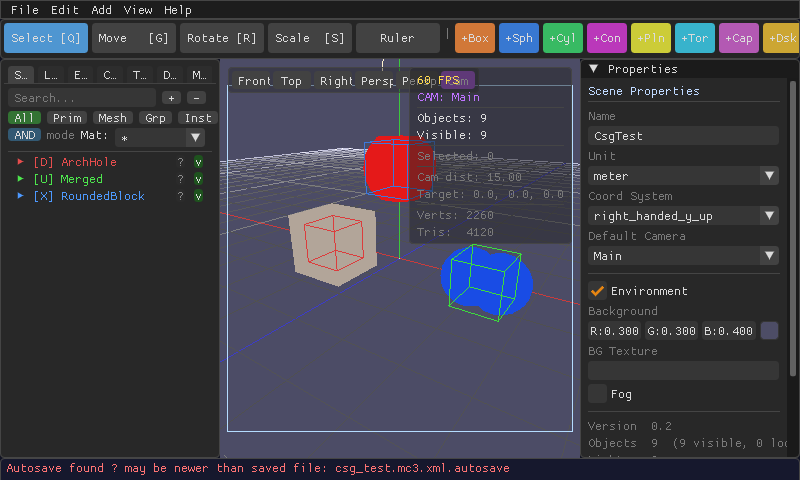
Union — glue shapes together
Merges every shape inside into one solid object, as if you welded them. Good for building complex objects out of overlapping primitives.
Difference — cut a hole
Subtracts one shape from another, like a cookie cutter or a drill bit. The shape doing the cutting is marked as the "cutter"; everything else is the base it's cut from.
Intersection — keep only the overlap
Keeps just the volume where all the shapes overlap, discarding the rest — handy for rounding off a box using a sphere, for example.
How to do it in the editor
- Create a CSG groupAdd → CSG → Union / Difference / Intersection. A new CSG node appears in the Scene hierarchy.
- Add shapes to itDrag existing objects onto the CSG node in the hierarchy panel, or select the CSG node and add new primitives to it directly.
- For a Difference, mark the cutterSelect the shape that should do the cutting and mark its role as cutter in the Properties panel — everything else in the group is treated as the base material being cut.
- DoneThe viewport updates immediately to show the real, solid result of the boolean operation.
A couple of current quirks
The result of a CSG operation currently uses flat shading and takes on the material of the CSG group itself rather than each child's individual material. Not every shape type can be used inside a CSG group when exporting — MeshCraft will tell you clearly if one can't.
CSG groups can be nested — put a Difference inside a Union, for example — for arbitrarily complex shapes built entirely from simple primitives.